

Engine marketing pages all look the same: a row of feature icons and a paragraph of adjectives. An agent took the opposite route and turned a 2D game engine's feature list into a game. Engine Showcase is nine capability stations in a 3×3 grid — each one a hands-on toy for one engine API, each with a live BENCH button that stresses your device until the frame time breaks budget. And the part that matters most here: not a single asset in it was made by a human. The coin atlas, terrain tileset, and robot body parts were generated with Seedream 4 through Floniks text-to-image; the two background-music tracks with Lyria 2 through Floniks text-to-music; a 130-line replayable Python script did all the post-processing. Play it in the browser — pick "Engine Showcase" from the menu.
This continues the series behind Build a Puzzle Game From One Screenshot and Ship a Visual Novel From One Sentence, on the same open-source engine (rust_bevy_lua_game).
One sentence in, nine stations out
The morning before, two parallel agent pipelines had closed every P0/P1 gap on the engine's roadmap: persistence, multi-touch, atlas animation, a camera rig, live audio mixing, CPU particles, a tilemap, cutout skeletal rigs, and local analytics — nine groups of game.* APIs, each merged with unit tests, the whole run logged in issues with timings down to the minute.
The afternoon brief was a single sentence: show every capability off as a game, and give each one a benchmark scene. Thirty-four minutes later, the demo was committed with every test green.
A feature list you can play
Engine Showcase is a 3×3 capability grid. Nine cards, one per API group — and tapping a card opens not documentation but a toy you can immediately put your hands on:
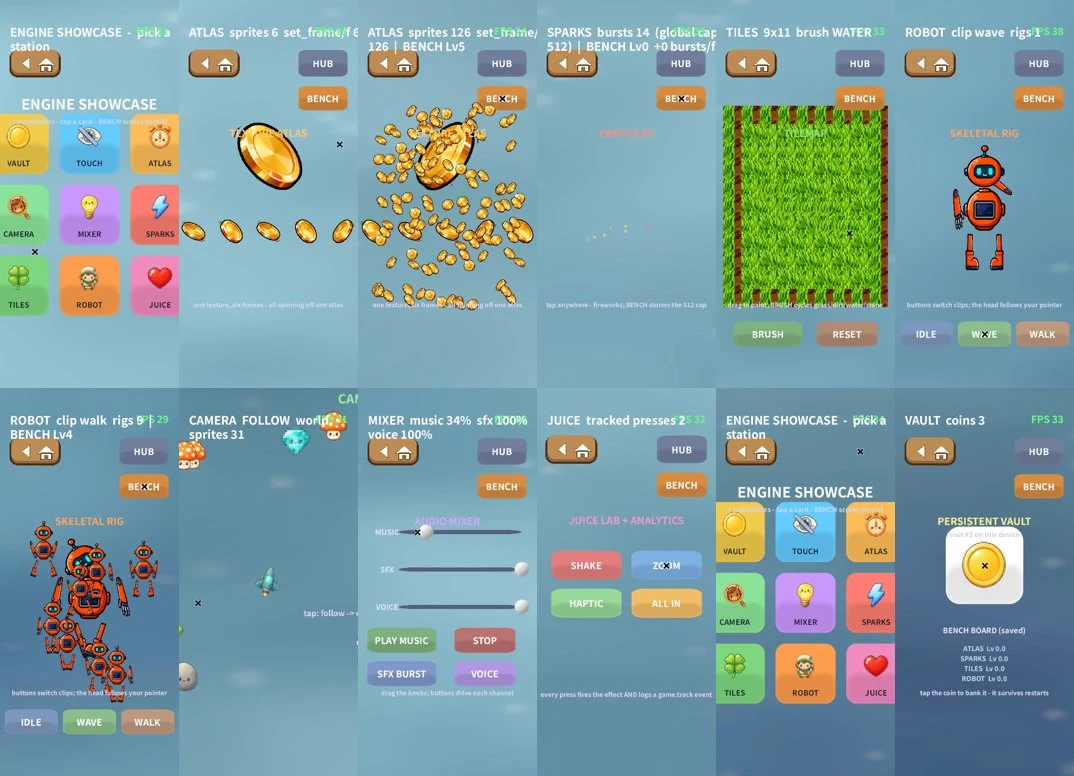
- VAULT — coins you bank survive a process kill (iOS sandbox, desktop config dir, browser localStorage — one API)
- TOUCH — one glowing ring per finger, up to eight
- ATLAS — a single six-frame sheet drives a screen full of spinning coins
- CAMERA — the lens chases a drone across a world three screens wide
- MIXER — a three-channel mixing desk with faders you can actually drag; the playing music changes live
- SPARKS — fireworks wherever you tap, with the global 512-particle cap made visible
- TILES — a terrain editor you paint with a finger, four brushes
- ROBOT — a cutout skeletal robot whose head tracks your finger
- JUICE — screen shake, zoom punch, haptics, and every press drops an analytics line
A benchmark button on every station
In the top-right corner of every station sits BENCH. Press it and the engine stresses itself in front of you: more sprites, more particles, bigger full-map rewrites, more walking skeletons — one level at a time, sampling real frame times over a sliding window, until the frame time can no longer hold the budget. The last level that held is frozen as your score and written into the save file. Your device's nine-way capability report hangs on the wall of the save station. And this is the most honest part of the demo: benchmark results are persisted with the very save API being benchmarked.
Not a single human-made asset
Every piece of art and music in the demo is generated, orchestrated end to end by the agent over MCP. The coin atlas, terrain tileset, and robot body parts came from Seedream 4 via Floniks text-to-image, as three 2048×1152 "grid sheets." The two music tracks — a showcase theme and a trailer cue — came from Lyria 2 via Floniks text-to-music. Post-processing is a 130-line replayable Python script: color-key matting, grid slicing, mirroring out missing parts, reassembling the strips the engine expects. One command re-runs the whole pipeline — swap a prompt, and you have reskinned the demo.
Three pitfalls worth writing down:
- Running the same Floniks workflow twice concurrently returned a node-cached old file — the trailer music downloaded with an md5 matching last week's BGM from a different game. A serial re-run fixed it; don't share one workflow id across concurrent executions.
- AI can't count grid cells: ask for 6 frames, get 8; ask for 6 body parts, get 6 plus two empty cells and no torso. Deterministic post-processing — pick the best frames, mirror a straight arm and a single boot into left/right pairs, promote the chest disc to a torso — is cheaper than re-rolling.
- The edge of a color key lives in the shadows: the generation kindly gave every coin a deep-purple drop shadow, and the first matting pass let them through. Tightening the key cleaned it up.
The robot is 47 lines of JSON
The robot's animation was never "authored" in any tool. robot.rig is a 47-line hand-written JSON file: the part hierarchy, rotation pivots, and three keyframe clips. Change one number and the animation changes. This is the concrete meaning of no editor, by design: the editor is data plus an agent. Writing the file took about four minutes — faster than any skeletal editor would even open.
Filming the ad fixed the product
Recording the product video (a native build under Xvfb with software rendering, scripted input, ffmpeg capture) stalled twice — and neither stall was the recording's fault:
- The CAMERA station could trap the player: after the camera tour, the world-anchored back button had drifted off-screen. Fix: taps now cycle follow → overview → auto-return to the hub.
- A fixed benchmark budget scores zero forever on slow devices: under software rendering, even an idle frame blows a 1/45s budget. Fix: the first cycle now calibrates the device's resting frame time, and the budget becomes baseline × 1.4 — low-end devices climb to a meaningful level, and high-refresh ones get no free points.
Shooting an ad for the product ended up repairing the product — probably the best payoff of the rule that a demo must be genuinely playable.
The clock
From the one-sentence task to a fully green commit: about 34 minutes, roughly 15 of them on the game pack itself — 630 lines of Lua, zero engine changes. The speed wasn't bought by skipping steps: all nine stations plug into the headless test suite, and 130,000+ assertions run before every commit. It was bought by architecture — every capability compresses to a line or two of Lua, and the test net makes "dare to change it" the default state.
Questions and answers
Were any of the demo's assets made by a human?
No. The coin atlas, terrain tileset, and robot parts were generated with Seedream 4 via Floniks text-to-image, and both music tracks with Lyria 2 via Floniks text-to-music. A 130-line Python script handled all post-processing; the only hand-written data file is the robot's 47-line JSON rig.
How does the live benchmark work?
Each station's BENCH button raises the load level by level — more sprites, more particles, bigger tilemap rewrites, more walking rigs — while sampling real frame times over a sliding window. When frame time breaks the budget, the last level that held is frozen as the score and persisted with the same save API being tested. The budget is calibrated per device: resting frame time × 1.4.
What exactly is the robot rig?
A 47-line hand-written JSON file: six body parts with parent-child hierarchy and rotation pivots, plus three keyframe clips (idle, wave, walk). Change a number and the animation changes — no skeletal editor involved.
Can the asset pipeline be replayed with a different style?
Yes. The whole pipeline — color-key matting, grid slicing, mirroring, strip reassembly — is one replayable 130-line Python script over Floniks generations. Swap the prompts, re-run one command, and the demo is reskinned.
Play Engine Showcase in your browser, read the full source at the rust_bevy_lua_game repository, and wire your own asset pipeline up with the Floniks MCP server.